How to Run Any App on Android Auto (Every Method, 2026)
Out of the box, Android Auto runs a short, curated list — navigation, media, messaging — rendered through Google's own templates. If you want more (a different map, a browser, your dashcam app, your whole desktop), there are several ways to get there, and they are not equally good. This is the honest 2026 map: every method, what it actually does, what it costs, and which one fits your goal.
The fast answer: pick by your goal
| Your goal | Best approach | Root? |
|---|---|---|
| Run one specific blocked app | App installer (AAAD-style) | No |
| Mirror your phone screen as-is | Screen-mirroring app | Usually |
| A full, independent desktop on the dash | Root + virtual-display projection | Yes |
| Plug-and-play, no phone setup | Aftermarket AI-box / head unit | No (hardware) |
What Android Auto gives you by default
Android Auto only shows apps that fit Google's driving-optimized templates — a deliberately small catalog. Everything else is blocked at the platform level, which is why the methods below exist. (For the reasoning behind the limit, see our guide on why Android Auto only allows certain apps.)
Why the catalog is closed in the first place is a design decision worth understanding before you work around it — we unpack it here. If you would rather see every tool side by side first, there is a comparison of all eight.
Method 1 — App installers (the AAAD route)
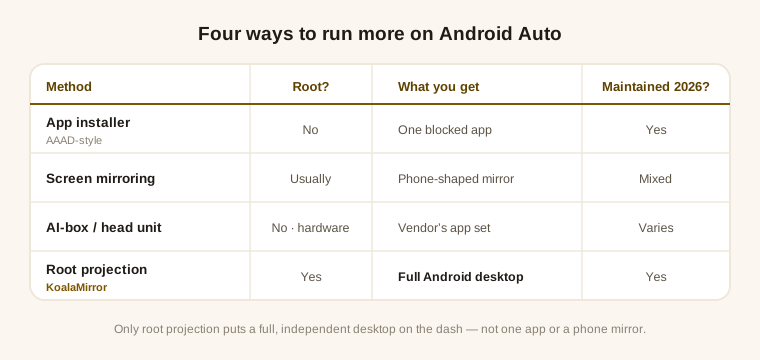
- What it does. Downloads and installs Android Auto apps that Google keeps off the Play Store, so they appear inside Android Auto. It is an installer, not a renderer.
- Needs. No root. The best-known option, AAAD, limits the free tier to one install per 30 days; a paid tier removes the cap.
- Trade-off. Installed apps can stop working after an Android Auto or system update, and Play Protect may flag them. Best for getting one or two specific blocked apps running.
Method 2 — Screen-mirroring apps
- What it does. Casts your phone's whole screen to the head unit (AA Mirror, Screen2Auto, and similar).
- Needs. Historically root; on current Android versions these generally need root again.
- Trade-off. Your phone is tied up showing the mirror, and the output is phone-shaped. Several once-popular options are aging — AAStream's last release was 2019 and the original CarStream stalled in 2021 — while Screen2Auto is closed-source and its current status is unclear. Best for a quick mirror if you have a working option and accept the phone-occupied trade-off.
Method 3 — Aftermarket AI-boxes and head units
- What it does. A hardware box (or a full aftermarket head unit) runs its own Android and presents apps to the car directly.
- Needs. No phone root — you buy hardware instead.
- Trade-off. Cost, another device to maintain, and quality varies a lot between vendors. Best for people who would rather not touch root and don't mind adding hardware.
Method 4 — Root + virtual-display projection
- What it does. With root and a Zygisk runtime, projects an independent Android desktop — any app, real layouts — onto the head unit, treating it as another screen of your phone. This is how KoalaMirror works, and the phone stays usable while it projects.
- Needs. A rooted phone (Magisk, KernelSU, or APatch) on Android 12L or newer.
- Trade-off. Requires root. Because it rides the Android Auto connection, it has to track Android Auto versions to stay compatible — that ongoing work is the cost. Best for a full desktop on the dash, not just one app or a phone-shaped mirror.
Two things are worth reading before you commit to this route: what root actually unlocks and what it leaves untouched, in the root guide, and the step-by-step itself, in how to mirror your full screen. The other well-known implementation of this same route bet on Xposed instead — why that broke, and what replaced it.
Which one should you pick?
- Just one blocked app, no root? An installer like AAAD is the simplest start.
- Don't want to root the phone at all? An AI-box moves the work to hardware.
- Already rooted, and you want your real desktop on the dash? Virtual-display projection is the only method that gives you a full, independent screen rather than a single app or a phone mirror. That is what KoalaMirror is built for.
Before you pick, two practical checks: your phone and car have to be on the verified matrix, and if your head unit has no touchscreen, read how a knob drives a projected desktop first. Once it runs, a car-friendly home screen is the next thing you will want — here is how to set one up. And if the car screen stays dark, the black-screen guide names the layer that lost the picture — and if it shows the wrong layout rather than nothing, that one is usually not a fault.