Android Auto Black Screen: Find the Failing Layer
A black screen has a short list of causes, and they sort cleanly by where the picture stops. Run the fast pass first — it clears most cases. If it survives, jump to the section that matches your symptom.
The fast pass
- Mirroring? Update the app first. Recent releases fixed several separate causes of a black car screen — including one that kept the mirror engine from starting at all, and one where a stalled connection stayed dead until a reboot.
- Swap to a known data cable and another USB port. Charge-only cables are the single most common cause.
- Reboot both ends — phone and head unit.
- Update Android Auto. Current releases (16.7+) need Android 12L or newer — on older Android they won't even install.
- On wireless? Test once over USB to split the problem in half.
- Mirroring with KoalaMirror? Run the in-app health check and fix the one item it flags.
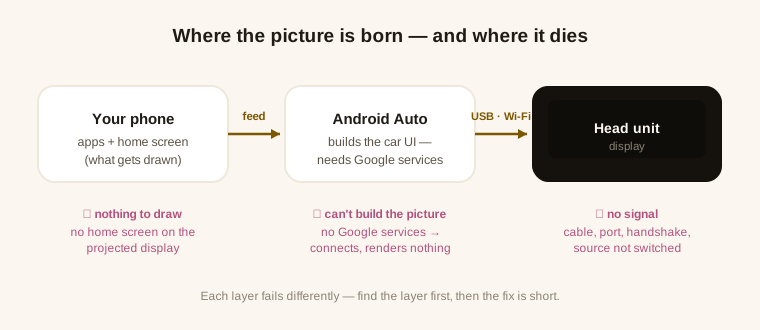
First, a fork: if the car shows something but the layout is wrong — split in two, navigation buttons missing — that is a different chain entirely, and usually not a fault at all. This page is for a screen that shows nothing.
The car never shows Android Auto
- Switch the head unit's source to Android Auto — some units also keep a master toggle, off by default.
- Exempt Android Auto from battery optimization — aggressive managers (Samsung One UI's sleeping-apps list, for example) kill it in the background.
- Wireless: Bluetooth on, 5 GHz Wi‑Fi free. If the phone is pinned to another network, the handshake dies silently. Re-pair from scratch if in doubt.
- Android 14: give the first connection a minute. It runs an extra permission check that must time out on its own — we've measured this; don't pull the plug at twenty seconds.
Connected, but the screen stays black
- Clear Android Auto's cache — the safe reset after an update.
- Custom ROM? Check Google services first, not the cable. Android Auto builds the car UI on Google Mobile Services. In our device testing, a GMS‑less ROM connected end to end and rendered nothing; a minimal GApps package on the same phone brought the picture up.
Mirroring a desktop? Two causes stock guides never see
- No home screen on the projected display. It's a real Android display — with no launcher on it, there is nothing to draw, and black is exactly what "nothing" looks like. Set a car-friendly one; KM Launcher is free and built for this seat.
- Deployed, but never rebooted. The projection module only activates after a restart — until then everything looks installed and nothing runs.
KoalaMirror's built-in health check walks this exact layer — root grant, module active, Google services, Android Auto version, launcher — and names the failing item instead of leaving you to guess.
If you are setting mirroring up for the first time rather than repairing it, the setup guide has the order of operations that avoids most of this.
One more shape worth knowing: if the car goes dark the moment you press the phone's power button, that is not a fault at all — both screens are sharing one power group.
One app is black — Netflix, a banking app, DRM video
If everything else projects but one specific app shows black, that is usually not a bug. Apps that handle DRM video or sensitive data — Netflix and many banking apps — set Android's FLAG_SECURE, which blocks their window from being shown on a second display by design. There is no setting for it, and root doesn't change it: the app is deliberately refusing to render anywhere but the phone's own screen. Everything without that flag projects normally.
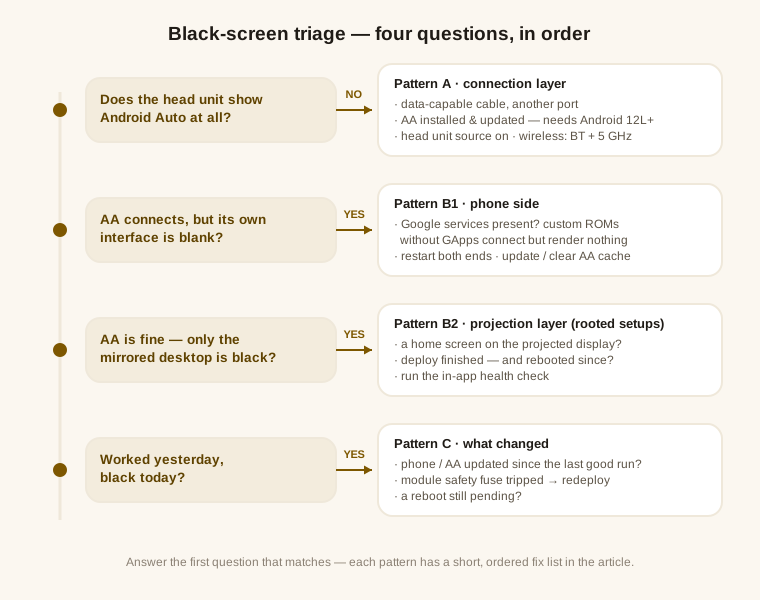
It worked yesterday
- Something updated — phone OS or Android Auto. Check both before suspecting hardware.
- KoalaMirror's safety fuse tripped. Repeated boot-time crashes auto-disable the module to protect the phone; re-deploy re-arms it, and the health check calls this state out.
- A reboot is still pending from an earlier update or re-deploy.
Still dark? Check the pairing itself against the verified Android and Android Auto matrix — a version combination we have never seen work is worth ruling out before you keep swapping cables. If it went dark right after an Android Auto update, that has its own short checklist.