Android Auto on a Head Unit With No Touchscreen
Plenty of cars have no touchscreen at all — you get a knob, a four-way pad, a confirm button and a back button, and that is the whole vocabulary. Android Auto itself is built for that. The question is what happens when the car screen is showing a mirrored Android desktop instead of Android Auto's own apps.
The short version
- It works. The knob steps through items on the projected screen, the four-way pad moves between areas, the center press opens, and back goes back.
- Focus support is part of full features. In Basic mode there is no projected-screen focus handling, so a knob has nothing to land on.
- The car's own navigation inputs are never taken over. Rotary, nudge, confirm and back keep their original job — no shortcut you configure can claim them.
- We verify the input model, not a list of cars. More on exactly what that means below.
What “no touchscreen” means to Android Auto
The general non-touch model in Android Auto is a rotary commander, not a six-key D-pad. That distinction is the source of most confusion, because the two produce completely different moves:
- Rotating moves the selection one item at a time inside the area you are already in — down a list, along a row of tiles.
- Nudging (the four-way pad) jumps between areas — from the nav bar to the list, from the list to the content.
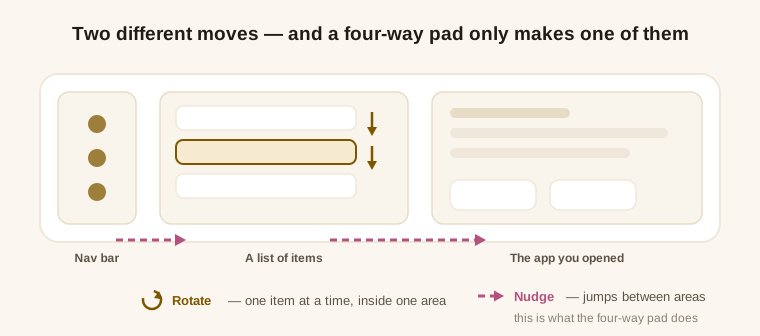
This is why pressing up and down in a list sometimes does nothing to the list itself while the highlight jumps somewhere else entirely: arrow keys are nudges, not scrolling. A car that truly only has four arrows and no rotation is a harder case — the head unit has to map its limited buttons onto rotate and nudge itself, and no amount of work on the phone side substitutes for that.
How the mirrored screen picks up focus at all
The projected desktop is a real Android display, and a real Android display starts out in touch mode — a state where nothing holds focus, because the system assumes you will touch what you want. On a car with no touchscreen that is a dead end: keys arrive, and there is nothing for them to move.
- KoalaMirror takes the projected display out of touch mode so a focus highlight exists in the first place.
- On Android 14 and up this applies to the projected display only — your phone screen is untouched.
- On Android 12L and 13 the platform only offers a global switch, so the phone briefly leaves touch mode too; the next real touch on the phone restores it automatically.
Back, Home and Recents from a knob
The navigation bar lives inside Android Auto's own interface rather than floating on top of it, which is what makes it reachable: a rotary knob can only land on things that are part of the interface it is navigating. Android Auto's own widgets underneath the bar are taken out of the focus order too, so the knob never stops on something invisible.
Pressing Home on that bar also has to hand focus back into the projected area — otherwise you would arrive at your desktop with nothing selected and the knob dead again. That handoff is done for you.
Which inputs stay Android Auto's
Eight navigation inputs are excluded from customization by design. You can map other buttons in your car freely — one action on a tap, another on a long press — but never these:
| Input | What it does | Can you remap it? |
|---|---|---|
| Rotary, both directions | Moves the selection inside the current area | No |
| Four-way nudge | Moves between areas | No |
| Confirm (center press) | Opens the selected item | No |
| Back | Goes back | No |
| Other steering-wheel and head-unit buttons | Whatever you assign — projected Home, Recents, Back, a specific app, a root command | Yes, with full features |
Anything you do not map is passed to Android Auto unchanged. The point of the exclusion list is simple: no configuration you make should be able to lock you out of the car's own interface while you are driving.
The home screen you land on matters more than usual here — a grid of large, evenly spaced tiles is far easier to step through with a knob than a dense phone launcher. Setting up a minimal car launcher covers that side.
What we have actually verified
Being precise about this matters more than a longer compatibility list would:
- The input model is verified end to end with no touch input available at all — on Google's Desktop Head Unit in its rotary profile, where touch is switched off entirely, plus real-device runs.
- We do not maintain a list of supported cars. Mazda Commander, BMW iDrive and Audi MMI are named here as the well-known examples of this input style, not as a claim that each one has been tested in a garage.
- The surrounding matrix still applies — Android 12L through 17, Android Auto 16.7 through 17.8, Google Mobile Services on the phone.
If your car has a knob and nothing moves
- Check your license state first. Projected-screen focus handling is a full-features capability; in Basic mode a knob genuinely has nothing to move.
- Confirm projection is actually running — the app's built-in health check names the failing item instead of leaving you guessing.
- Update to the current version. Focus behaviour is one of the areas Android Auto changes between releases, and fixes ship with it.
- Try rotating rather than nudging. If the highlight jumps across the screen instead of moving one row, you are sending nudges — the list needs rotation.
For the wider picture — every method of getting your apps onto the head unit, not just the input side — see how to run any app on Android Auto.