Android Auto Updated and Mirroring Broke
It worked yesterday. Android Auto updated overnight, and now the car screen is wrong. This is a recognisable class of problem with a small number of causes — and the fix depends entirely on which way it is wrong, so sort that first.
The fast pass
- Update the mirroring app first, before anything else. Version tracking is the actual job here (see below), and a fix for the new Android Auto release may already be waiting.
- Reconnect once. Several things only re-apply on a fresh connection, so a single unplug-and-replug rules out a whole class of confusion.
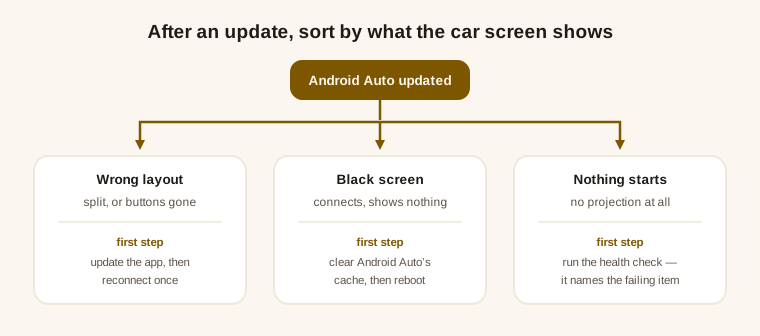
- Then match your symptom to one of the three below.
Wrong layout: split, or the buttons vanished
The most common post-update shape, and often not a fault at all — the three normal layouts and the one that isn't sorts that out in about ten seconds. When an update genuinely is the cause, it is usually one of two things: the layout rewrite arriving too late in the connection, or a stale copy of Android Auto still being used after the update. Both have happened, both were fixed in later releases — which is why step one is updating.
Black screen: connects, shows nothing
Clearing Android Auto's cache is the safe reset after an update, and it resolves a surprising share of these. If it doesn't, the black-screen guide works down the layers — the picture can die in more than one place, and each place has a different symptom.
Nothing starts at all
If projection doesn't come up, the in-app health check is faster than guessing: it walks the same chain every time — root access, module active, Google services, Android Auto version, launcher — and names the item that failed rather than leaving you to bisect it yourself. After a major update it is also worth a reboot, because the projection engine loads at startup.
Why an update can break it at all
Android Auto is not a static target. It ships roughly monthly, and it is free to reorganise its own internals between releases. Mirroring works by changing how Android Auto builds the car interface, so when the interface is rebuilt differently, the adaptation has to be rebuilt too. That is ongoing work, not a one-off — it is what a license actually pays for.
This is also why version tracking is published rather than promised. Here is the matrix as it stands, generated from the same source the app checks against:
| Phone Android \ Android Auto | 17.8 | 17.1, 17.2, 17.3, 17.4, 17.5, 17.6, 17.7 | 17.0 | 16.8, 16.9 | 16.7 |
|---|---|---|---|---|---|
| Android 15 · 16 · 17 | ✓ | ✓ | ✓ | ✓ | ✓ |
| Android 12L · 13 · 14 | ✓ | ✓ | ✓ | ✓ | ✓ |
12 Android Auto releases verified · last checked 2026-09-29 — every column was tested, not assumed
Android platform releases matter the same way. When Android 17 arrived, mirroring broke on it for a specific structural reason and was fixed in the release that followed — the same cycle, on a longer clock.
If it still doesn't work
- Check the pairing against the matrix above. A combination outside it is worth ruling out before you keep changing things — the full compatibility picture covers the phone and car sides too.
- Send a report from inside the app. It carries the diagnostic state with it, which is the difference between “broken after update” and a report someone can actually act on.