Phone Screen Off While Mirroring to Android Auto
Mirroring works, the car screen looks great — and your phone sits in the cradle at full brightness for the entire drive. It burns battery, it lights up the cabin at night, and on an OLED panel it is not doing your phone any favours. The obvious question follows: can the phone screen just be off?
The short answer
- Yes — if the car display has its own power group. Then the phone sleeps on its normal timeout and the head unit keeps drawing.
- Most mirroring can't do it because both screens share one power state, and the usual advice you will find is “just turn the brightness all the way down” — a workaround, not an answer.
- If your phone screen stays lit the whole drive, that is the symptom — the projected display landed in the phone's group.
Why most mirroring keeps the phone awake
Android sorts displays into power groups. Screens in the same group sleep and wake together — that is the entire point of a group. So when something needs the car screen to stay awake, it keeps the whole group awake, and your phone panel is in that group.
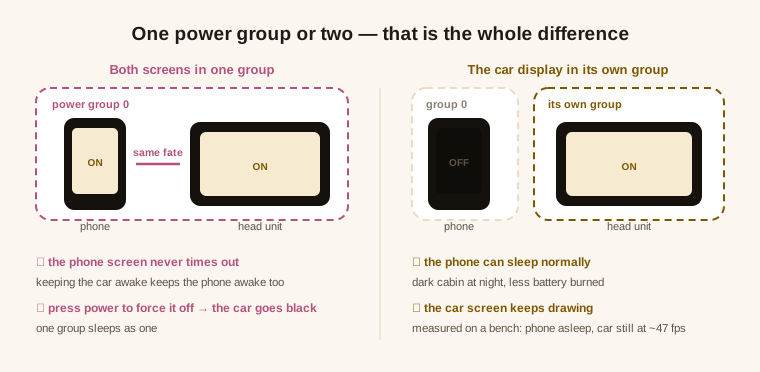
The two symptoms of a shared group
- The phone screen never times out. Nothing is broken — keeping the car awake is keeping the phone awake, because they are the same group.
- Press power to force it off, and the car goes black. Also not a crash: one group sleeps as one. This is the version of a black car screen that has nothing to do with cables or Android Auto itself — the other causes are here.
Those two go together. If you have one, you have the other, and they point at the same thing.
What it takes to separate them
The projected display has to be placed in its own group at the moment it is created. It is not a setting you can flip afterwards, which is why “is there an option for this?” usually gets an unsatisfying answer — by the time you are looking for the option, the display already exists.
When it is set up correctly the separation is complete: on the bench, sending the phone to sleep leaves the projected side awake and still drawing at roughly 47 frames per second — phone dark, car running.
When it doesn't work: a real case
This is worth telling honestly, because it shows what actually goes wrong. A driver on a Samsung Galaxy running One UI 8 (Android 16) reported exactly the two symptoms above. His car worked; his phone screen would not go dark.
The cause was on the ROM side. Manufacturer builds reshape parts of the Android system internals, and on that build the pieces used to place a display into its own group had been reorganised — so the projected display quietly fell back into group 0, the phone's group. Everything else worked, which is why it looked like a missing feature rather than a fault. Rebuilding that step on more stable ground fixed it, and the driver's reply after the update was short: the screen-off now works too.
How to tell which side you are on
- Connect and let mirroring start as usual, then put the phone down and don't touch it.
- Wait out your normal screen timeout. Phone goes dark, car keeps running? Separate groups — you are done.
- Phone still lit well past the timeout? Shared group.
- Confirm with the power button. If the car screen dies with the phone screen, both were in one group; if the car carries on, they were already separate.
Worth knowing before you start: this is a projection-level property, not a per-app setting, so no app you install on the car side will change it — how the projection itself is set up is what decides it.