Can an Android Phone Use CarPlay?
Not directly. CarPlay is Apple's system for the iPhone. A car with CarPlay waits for an iPhone to connect, and there is no CarPlay app for Android that changes that. Android's own counterpart is Android Auto, which only helps if the car supports it. If your car has CarPlay only, there are two workarounds: an AI box that runs its own Android in the car's CarPlay port, or KM Space, an app that runs a second Android on your phone and takes it to the car over wireless CarPlay.
The short answer
| Your car | What works |
|---|---|
| Has Android Auto as well as CarPlay | Use Android Auto. Nothing extra to buy or install |
| CarPlay only, and you are fine adding hardware | An Android AI box in the car's CarPlay USB port |
| Wireless CarPlay, and you want it done by an app on your phone | KM Space (no root, coming soon) |
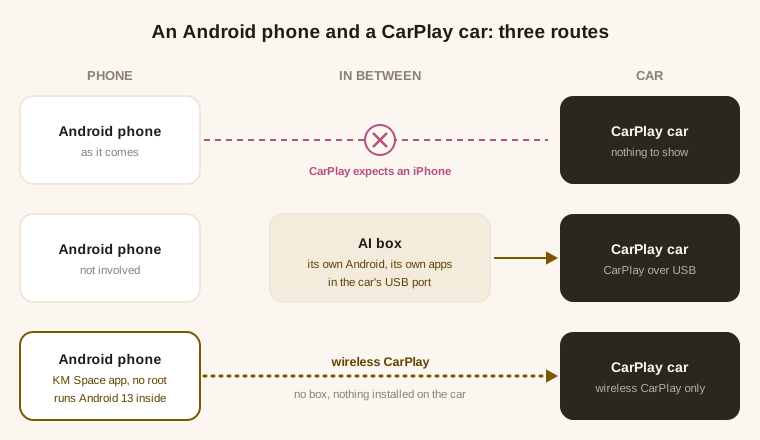
Why an Android phone cannot use CarPlay by itself
- CarPlay is Apple's. Apple builds it into the iPhone and does not offer it for Android, so the car never sees an Android phone as a CarPlay device.
- A wireless CarPlay adapter does not change this. Those adapters make an iPhone's CarPlay wireless. They still need an iPhone on the other end.
- Check for Android Auto first. Many cars that have CarPlay also have Android Auto. If yours does, that is the built-in way to use an Android phone in the car, and you can stop here. To get more apps on it than Google allows, see every way to run more apps on Android Auto.
Workaround 1: an Android AI box
An AI box is a small computer that plugs into the USB port the car uses for CarPlay. The car treats it as a CarPlay device, and the box shows its own Android on the car screen.
- Your phone is not part of it. The apps run on the box, so you install them and sign in again there. What is on your phone stays on your phone.
- It is hardware to buy and keep working. Quality and updates vary a lot between makers.
Workaround 2: KM Space, no root, no box
KM Space is an ordinary Android app. It runs a complete Android 13 inside itself, called a Space, with its own home screen, settings and storage, and the phone is not rooted or modified. When the car supports wireless CarPlay, KM Space shows the running Space on the car screen and you use it from the car's touchscreen. Nothing is installed on the car.
- The apps are the ones you install in the Space. You sign in to a Google account inside the Space and install from Google Play, as on a new phone. Apps on your phone do not appear there by themselves.
- Pair once, then drive. You pair the car once from KM Space's car page, and from then on it connects to that car.
- The first 30 days are free, car included. After that it is a Google Play subscription. Plans are on the KM Space page.
What you need:
- A car with wireless CarPlay. KM Space connects over wireless CarPlay, with no cable and nothing to install on the car.
- An Android phone on 8.1 or newer. No root, and nothing on the phone is modified.
If you also have a rooted phone and a car with Android Auto, there is a different route that puts your phone's own apps on the screen: KM Auto vs KM Space explains which fits.
KM Space is coming soon to Google Play. What it does, what it costs and what it needs are on the KM Space page, and more answers are in the FAQ.